

Getting started
Deploy
Deploy a Worker to Rivet Cloud with orange deploy, or self-host its Docker image on any cloud or on your own servers.
Your Worker ships as a standard Docker image, so it runs on any cloud and on your own servers. Rivet Cloud is the quickest path. To run everything yourself, see Self-host.
- AWS
- Google Cloud
- Azure
- Rivet Cloud
- Your servers
Deploy to Rivet Cloud
Rivet runs the cluster for you on AWS or Google Cloud, in the region you choose.
orange deploy builds your Worker into a Docker image, uploads it, and rolls a
runner pool out to it.
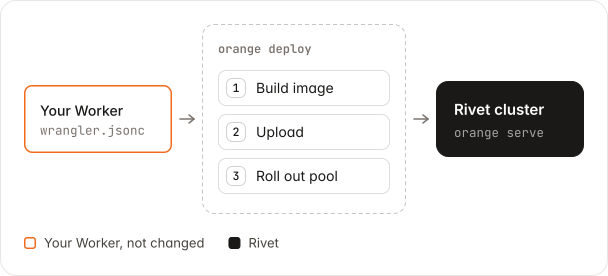
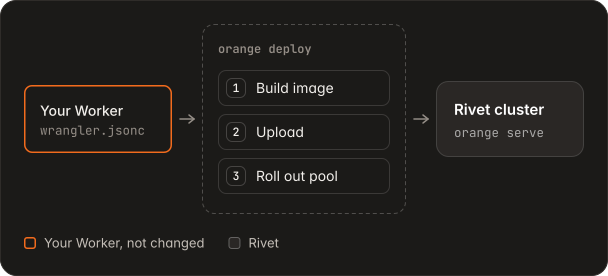
You need Docker running, a Rivet Cloud cluster, and a Worker project with its
packages installed. These steps deploy
examples/hello-durable-object.
-
Sign in
Approve the code in the browser that opens.
orange login Your one-time code: ABCD-EFGH Opened https://… in your browser. Waiting for approval… Signed in as you@example.com. Next: orange link --cluster <name> -
Link the cluster
Run this in the Worker’s directory.
orange link --cluster my-cluster Linked cluster my-cluster in /home/me/hello-durable-object/.rivet/project.json. Next: orange deploy Run orange mcp to connect your coding agent to the Rivet MCP for cluster my-cluster. -
Deploy
orange deployprints each stage after Docker’s build output.orange deploy Deploying hello-durable-object to cluster my-cluster, region <region>, pool default Building hello-durable-object:20261112-093000 for linux/amd64… Uploading build <build-id> (427.8 MiB)… Preparing build <build-id>. This takes a few minutes… ✓ Build <build-id> ready Creating pool default with build <build-id>… ✓ Deployed hello-durable-object:20261112-093000 to pool default in <region> Build <build-id> URL <pool URL>Run
orange deployagain to roll out each new version. -
Call the Worker
The pool’s URL serves your Worker.
curl <pool URL>/alice
{"greeting":"Hello, alice!","visits":1}
Self-host
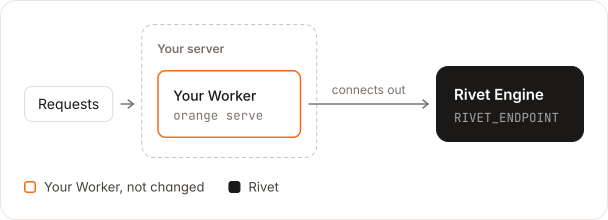
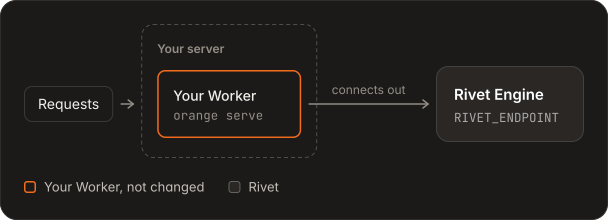
Run the same image on your own cloud or servers. You run two parts: the control plane, which is the Rivet Engine, and your Worker nodes, which connect out to it.
-
Build the image
orange deploy --dry-runwrites the build and prints thedockercommands for your Worker. It needs no sign-in.orange deploy --dry-run --outdir out docker build --platform linux/amd64 -f out/Dockerfile -t hello-durable-object:20261112-093000 out/contextPush the image to a registry that your servers can pull from.
-
Deploy the control plane
The Rivet Engine schedules your Durable Objects onto your nodes and routes requests to them. Deploy it once with Rivet’s self-hosting guide, which covers Kubernetes, AWS ECS, Docker Compose, VMs, Hetzner, Railway, and Render.
Then create the
defaultnode pool, as in Rivet’s node guide. The control plane refuses a node whose pool does not exist. -
Run your Worker nodes
Each node is a container of your image. Point it at the control plane’s endpoint, with its namespace and token.
docker run --rm -p 8080:8080 \
  -e 'RIVET_ENDPOINT=https://<namespace>:<token>@<engine-host>' \
  hello-durable-object:20261112-093000
orange serve listening on http://0.0.0.0:8080
Run as many nodes as you need, on any platform that keeps a container running. Rivet has node guides for Kubernetes, AWS ECS, Docker Compose, VMs, Hetzner, Railway, and Render.
-
Call the Worker
curl localhost:8080/alice
{"greeting":"Hello, alice!","visits":1}
Bring your own cloud
With BYOC, Rivet runs the cluster in your own AWS, Google Cloud, or Azure account. A BYOC cluster is a Rivet Cloud cluster, so Deploy to Rivet Cloud works as written. See Rivet’s BYOC guide.
Variables and secrets
Pass secrets in a file and variables as flags. Your Worker reads both from
env, such as env.API_KEY.
orange deploy --secrets-file .dev.vars --var LOG_LEVEL:debugNever put a secret in vars. Everything in vars goes into the image.
Deploy from CI
Make a cluster token in the Rivet dashboard: open the cluster, then Settings →
API tokens. Give it the Read and Deploy scopes, and set it in RIVET_CLOUD_TOKEN.
A cluster token cannot create a runner pool, so the pool must exist first. Create it in
the dashboard, or deploy one time with orange login.
RIVET_CLOUD_TOKEN=<cluster token> orange deploy --cluster my-clusterAI context Sign-in, every flag, secret rules, refused values, rollback, failed deploys, and self-host details
Written for LLMs and coding agents: every edge case, measurement, and known deviation. You do not need it to use the feature.
Sign in
orange login, logout, whoami, link, and unlink work like the same
Rivet CLI commands and use the same files, so a
rivet login session and a rivet link --cluster link work with Orange too.
openorange and open-orange are the same command as orange.
| File | What it holds |
|---|---|
~/.rivet/credentials | The login session, refreshed as needed |
.rivet/project.json | The cluster and organization of this directory. Commands in it and below it use this cluster, because they search upward for the file. |
After orange link, run orange mcp to connect your coding agent to the Rivet MCP for the
linked cluster. It prints the command for the agent you use and changes no configuration.
orange mcp --json gives the command for every agent. orange link prints its last line,
the orange mcp reminder, until an agent configuration has the Rivet MCP.
Orange finds credentials in this order:
--tokenRIVET_CLOUD_TOKEN- The login session
- A Cloud API token in
~/.rivet/credentials
Cluster tokens for CI
In CI, name the cluster with --cluster or RIVET_CLUSTER. The cluster token in
RIVET_CLOUD_TOKEN needs these scopes:
| Token scope | When |
|---|---|
| Read and Deploy | Always |
Secrets write (rivet:cluster:secrets:write) | When the deploy passes --var, --secret, or --secrets-file |
What happens during a deploy
- Orange reads the cluster’s regions. This checks the token and the cluster before anything is built.
- Orange runs
build.commandfrom the Wrangler configuration, if there is one, on the machine that deploys, aswrangler deploydoes. docker build --platform linux/amd64builds the image, anddocker image savewrites it to a tarball. Rivet clusters take images up to 5 GiB.- Orange registers a build, uploads the tarball to the build’s upload URL,
and waits until the build is
ready. Rivet Cloud prepares a build in 3 to 5 minutes. In a terminal, Orange shows the bytes sent and the upload rate. When the connection drops, or Rivet Cloud or storage answers 408, 429, or 5xx, Orange sends the request again, up to 3 attempts in total. - Orange rolls the runner pool out to the build. With an
orange loginsession, it creates the pool if it does not exist, and printsCreating pool default. With a cluster token, the pool must exist. Every later deploy rolls the same pool out to a new build, and printsRolling out pool defaultinstead. An existing pool keeps its CIDR allowlist, machine type, and node count unless you pass--machine-typeor--node-count. - Orange waits until every node of the pool runs the build, then prints the pool’s public URL.
| Failure | Result |
|---|---|
build.command fails | The deploy stops. |
| The build fails | The deploy stops before the pool changes. |
The pool goes degraded or down during the rollout | The deploy stops. Orange prints the pool’s reason and the command that rolls the pool back to its earlier build. |
--build <id> builds nothing, so it skips steps 2 to 4.
What goes into the image
- The project directory, without
.git,node_modules,.open-orange,.rivet,.wrangler,.dev.vars*,.env, and.env.*. - The Worker’s packages, bundled into its entry file on the machine that deploys, so install them
first. This is how
workspace:andfile:dependencies work. The image installs nothing for the Worker, so a package that reads its own files at runtime cannot find them. - The Orange build that runs the command, with its locked dependencies.
CMD ["orange", "serve", ...]with your--configand-evalues.
The image holds no Rivet credentials. The cluster sets RIVET_ENDPOINT,
RIVET_TOKEN, RIVET_NAMESPACE, and RIVET_POOL when it starts a runner,
and orange serve connects to the cluster as a runner.
The build goes to .open-orange/deploy/, or to --outdir <dir>.
Variables and secrets in detail
| Source | Reaches the deployed Worker |
|---|---|
vars in the Wrangler configuration | Yes, inside the image |
--var NAME:value | Yes, in the runner pool’s environment. Replaces a vars entry of the same name. |
--secrets-file <path> | Yes. Orange rolls each entry out as a cluster secret, and the pool’s environment names it. The file is a JSON object or .env lines, as for wrangler secret bulk. |
--secret KEY[=SECRET_NAME] | Yes. env.KEY reads a secret the cluster already holds, named KEY unless you give SECRET_NAME, as with rivet deploy --secret. |
.dev.vars and .env entries | Only through --secrets-file .dev.vars. They never enter the image. |
A secret managed with the rivet CLI:
rivet cluster secret set DATABASE_URL
orange deploy --secret DATABASE_URL
Where a secret’s value goes
- It never goes in an argument, the image, or Orange’s output.
- Orange sends it only to the Rivet Cloud API, which stores it encrypted.
- The cluster gives it to each runner when the runner starts.
What a deploy changes
- A deploy without
--var,--secret, or--secrets-fileleaves the pool’s variables as they are. --var,--secret, and--secrets-fileadd to the pool’s variables and keep the rest, asrivet deploy --envdoes.- To remove a variable, run
rivet cluster env unset KEY.
How --secrets-file names secrets
- It names each secret like its variable, as
rivetdoes.API_KEYbecomes the cluster secretAPI_KEY, andrivet cluster secret set API_KEYchanges what the Worker reads. - Two Workers in one cluster that use the same variable name share one secret. To keep them
apart, set each secret under its own name and pass
--secret API_KEY=<SECRET_NAME>. - A new value rolls every pool that uses the secret. So a deploy that changes a secret rolls the running build one time with the new value, then rolls to the new build.
- An unchanged value rolls nothing.
Values that Orange refuses
Orange refuses these before it builds or writes anything:
| Value or name | Why |
|---|---|
| A value with a line break or another control character, such as a PEM key | Values are one line. Encode it with base64 -w0 key.pem, and decode it in the Worker with atob(env.KEY). |
A --secrets-file name over 64 characters | A cluster secret’s name holds at most 64. |
| A secret over 1,024 bytes | Keep large material in R2 or KV, and put the key to it in the secret. |
An empty value in --secrets-file | An empty secret is usually a mistake. Give it a value, or remove the line. |
A --secret that the cluster does not hold | Set it first with rivet cluster secret set, or pass it in --secrets-file. |
| More than 64 secrets on the cluster, or more than 256 variables or 32 KiB on the pool | Rivet’s limits. |
RIVET_ENDPOINT, RIVET_TOKEN, PORT, RIVET_USER_DATA_*, and the other names Rivet sets | Rivet sets them on every runner. |
| A name already used by another binding, such as a KV namespace | A variable cannot replace a binding. |
-e selects a Wrangler environment
orange deploy -e staging works as wrangler deploy -e staging: it selects the
env.staging block of the configuration. It does not set a variable. Orange
rejects an -e value that contains =.
Roll back
Every deploy prints its build ID. To roll a pool back, pass an earlier build
with --build:
orange deploy --cluster my-cluster --pool default --build <build-id>Fix a failed deploy
| Response | Meaning |
|---|---|
| 401 | The token is missing, invalid, or expired. |
| 403 | The token’s organization does not own the cluster. |
| 404, cluster not found | The cluster does not exist, or the token belongs to another organization. |
| 402 | The organization’s plan or payment method does not cover the pool. |
| 400 | A value is invalid. Orange prints each field error. |
A pool that goes degraded or down stops the deploy, as in
What happens during a deploy.
Self-host in detail
The image runs as a runner of your own Rivet Engine. The runner connects out to the Engine, so the Engine does not need to reach the container.
orange deploy --dry-run --outdir out calls no API. Its output ends with the
two commands to run:
Self-host
  docker build --platform linux/amd64 -f /home/me/hello-durable-object/out/Dockerfile -t hello-durable-object:20261112-093000 /home/me/hello-durable-object/out/context
  docker run --rm -p 8080:8080 -e 'RIVET_ENDPOINT=https://<namespace>:<token>@<engine-host>' hello-durable-object:20261112-093000
The image name is the Worker’s name, and the tag is the UTC time. Docker’s last
step tags the image hello-durable-object:20261112-093000.
orange serve also reads RIVET_TOKEN and RIVET_NAMESPACE when the
endpoint URL does not carry them, and RIVET_POOL, which defaults to
default. A dry run with --var or --secrets-file adds each one to the
docker run command, and passes each secret as a bare -e NAME, so Docker
reads the value from your shell.
Options
| Flag | Meaning |
|---|---|
-c, --config <path> | Wrangler configuration file. One Worker per deploy. |
-e, --env <name> | Wrangler environment from the configuration. Not a variable. |
--cluster <name> | Cluster to deploy to. Default: RIVET_CLUSTER, then the linked cluster. Required. |
--org <slug> | Organization of the cluster. Default: RIVET_ORG, then the linked organization. |
--region <region> | Region of the pool. Default: the cluster’s only region. A cluster with several regions needs this flag. |
--pool <name> | Runner pool. Default: default. |
--var <NAME:value> | Set a variable in the pool’s environment. Repeat for more. See Variables and secrets. |
--secret <KEY[=SECRET_NAME]> | Set KEY to a cluster secret the cluster holds. Repeat for more. |
--secrets-file <path> | Roll out secrets from a JSON object or .env file, and set them on the pool. |
--token <token> | Rivet Cloud API token. Default: RIVET_CLOUD_TOKEN, then the login session. Prefer the variable, because a flag stays in your shell history. The token selects the organization. |
--cloud-api <url> | Rivet Cloud API. Default: https://cloud-api.rivet.dev. |
--build <id> | Roll the pool out to a build that is ready. Orange builds and uploads nothing. |
--image <name> | Image name recorded on the build. Default: the Worker name. |
--tag <tag> | Image tag. Default: the UTC time, such as 20261028-213000. |
--machine-type <type> | Machine type of the pool’s nodes, such as e2-small. The cluster’s plan limits the types. |
--node-count <count> | Number of nodes in the pool. |
--dry-run | Write the build context and print the plan. Orange calls no API. |
--outdir <dir> | Write Dockerfile and context/ here. |
A new pool without --machine-type and --node-count gets the Rivet Cloud defaults. Orange sends neither value.
Dry run and --outdir
--dry-run writes the build and prints the resolved cluster, region, pool, and
image, and the docker commands for a self-hosted run. It prints the token as
<redacted>. It sends nothing to Rivet Cloud, so it does not check the token.
--outdir <dir> writes Dockerfile and context/ to <dir>. It works with
and without --dry-run, as in wrangler deploy --outdir. Unlike Wrangler,
Orange refuses a directory that holds files it did not write, because a build
context with stale files would go into the image. A later run replaces its own
Dockerfile and context/.